SMED training in virtual reality
Changeover Simulator VR. Shorten machine changeover time — with no line downtime
The operator trains the full changeover procedure on a virtual copy of your machine — step by step, as many times as needed, without stopping production and with no risk of damage.

The app in action
Changeover step by step — in a virtual copy of the machine
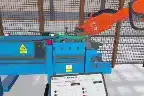
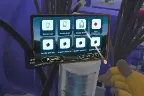
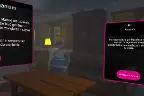
The operator reads the task list on a virtual tablet and carries out the steps in the right order. The app highlights components and responds like a real machine.
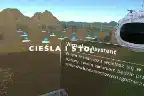
Operator panel
Panel operation and task list
- A virtual control panel with machine parameters.
- The “Tasks to do” tablet leads through the whole procedure.
- Sequence control — the app enforces the correct order.
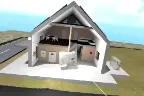
Machine hall
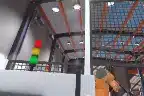
Work in a replicated hall
- A faithfully recreated workstation — valves, guards, assemblies.
- Free movement around the hall, as in real work.
- The next changeover steps in a natural setting.
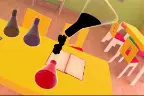
Format change
Highlighted parts to replace
- Colour-coded parts for removal and fitting.
- A clear sequence for a product change.
- Fewer mistakes when changing rollers and format.
📋 In short — Changeover Simulator VR (SMED)
A VR app for training production machine changeovers with the SMED method. The operator practises the full format change procedure on a digital replica of the machine — without stopping the line and with no risk of damage. Ideal for standardising procedures and onboarding new operators.
- What it trains: the full changeover / format change procedure, the order of operations, the split between internal and external activities (SMED).
- Features: task list on a tablet, component highlighting, sequence control, session report (time, errors, correctness), instructor mode.
- Customisation: we replicate a specific machine and your plant’s procedure (a 1:1 digital twin).
- For: FMCG and packaging, printing and paper converting, automotive, plastics processing.
- Hardware: Meta Quest 3 — standalone, with no interference in the physical machine.
The SMED method in practice
From chaos to a repeatable procedure
SMED (Single-Minute Exchange of Die) is a method of shortening changeover time. The simulator lets you practise each of its stages before you step onto the shop floor.
Stage 1
Separate the activities
The operator learns to tell internal activities (when the machine must stand still) from external ones (possible while it runs). The foundation of shorter downtime.
Stage 2
Prepare and convert
Preparing tools and parts in advance and converting internal activities into external ones — so the machine stands still for as short a time as possible.
Stage 3
Streamline and standardise
Repeated sessions fix one optimal sequence. The report from every attempt shows where time is being lost.
Benefits
What your plant gains
Shorten real changeover time, reduce errors and standardise the procedure — without stopping production.
Shorter real changeover time
A practised, standardised procedure = faster and predictable changeovers on the real line.
Zero downtime for training
Training in a headset, not on the machine — the line produces while operators practise in parallel.
Fewer errors and rejects
Sequence control and instant feedback reduce the mistakes that mean rejects on the shop floor.
Faster onboarding
A new employee learns the procedure before touching the machine — taking the load off experienced operators.
Safety and standardisation
Expert knowledge captured in one repeatable scenario — independent of staff turnover.
Measurable progress
A report from every session (time, errors, correctness) lets you assess operator readiness objectively.
Deployment — case study
A changeover simulator for Velvet Care
App excerpt from the deployment (DemoDay KPT ScaleUP 2020)
A digital twin of a production machine
For Velvet Care — a producer of paper hygiene products — we built a virtual machine changeover simulator. Operators practise the full procedure in a digital replica of the workstation.
- 1:1 replica — panel, valves, assemblies and the working space.
- Step-by-step procedure — the virtual “Tasks to do” tablet.
- Training without downtime — learning off the shop floor, without tying up the line.
- Presented at the DemoDay of the KPT ScaleUP programme (Kraków Technology Park).
App, hardware and deployment — on one invoice
We build a digital twin of your machine, supply Meta Quest 3 headsets with the app installed and train your staff. Ready for training from the first second — with no interference in the physical production line.
Who it is for
Wherever format change time matters
The more frequent the changeovers and the shorter the runs, the greater the return from a trained procedure — in every role in the plant.
- Higher OEE — shorter and predictable changeovers raise line availability.
- Standardisation — one procedure, independent of staff turnover.
- Data — session reports: time, errors, correctness.
- Safety — no risk of damage or safety incidents during learning.
Packing lines with frequent format changes — every changeover affects machine availability.
Machines with roller, forme and setting changes — as in the Velvet Care deployment.
Injection moulding machines and presses, where a mould change translates directly into production time.
Implement SMED and fix one optimal changeover sequence across the whole team.
Uniform operator onboarding with an automatic progress report.
Training risky tasks in a 100% safe environment.
How we deploy
From your machine to a finished simulator
Procedure analysis
We map the changeover procedure: activities, sequence, critical points and the most common errors.
Building the twin
We replicate the machine and workstation in VR — interactive components, task list, sequence logic.
Delivery and training
We deliver the app with Meta Quest 3 headsets and train the team and instructors.
Support and expansion
We extend the scenario library with further machines, formats and emergency situations.
Free demo
Put the headset on before you stop the line
Leave your details — we will show the simulator in action, discuss your machine’s procedure and prepare an offer matched to your plant.
- Demo online or on site — you will see the full changeover procedure in VR.
- A scenario for your machine — we replicate a specific workstation and procedure.
- Hardware and deployment — headsets, app, staff training and support.
- One invoice — app, hardware and support from one supplier.
Book a free demo
See also
SMED and line changeover training in VR — why simulate what can be shown on the shop floor
Every production line changeover practised on a real machine costs downtime. In VR the operator runs the SMED sequence — removal, format change, set-up, start-up — as many times as needed, and the system measures the time and errors of every attempt. Training is run during the shift, without blocking the line and with no risk of damaging tooling.
Deployments of changeover and machine operation training
Three plants, three different machines — from a paper line, through a cylinder head foundry, to pump assembly. The common denominator: a sequence of operations practised before production stops.
Velvet CARE — virtual line changeover
Challenge: Shorten line stoppage during changeover and reduce operator errors when changing format.
Solution: VR training that recreates the changeover of a specific Velvet CARE line step by step, with control of the order and safety of operations.
Result: The client reports shorter production stoppage; figures are available on request.
Toyota — operating the TNGA 1.5 cylinder head casting machine
Challenge: Prepare future employees to operate the casting machine before they reach the workstation.
Solution: Toyota Engine Assembly VR training: operating procedures for the TNGA 1.5 engine cylinder head casting machine in a virtual copy of the workstation.
Result: Deployment results are available on request — the data is held by the client.
Colgate-Palmolive — assembly of sealed pumps
Challenge: New employees must assemble and disassemble pumps with single and double seals without error.
Solution: VR training with the full pump assembly and disassembly sequence, with control of the order and correctness of every step.
Result: Since 2021, training at Colgate-Palmolive has been run in VR — safely, repeatably and without tying up the line.
Your deployment could be next
We will show the app online in 30 minutes, calculate the cost for your number of stations and propose a pilot.
Frequently asked questions
Does the simulator replicate our specific machine?
Yes. We build a digital twin of the chosen machine and workstation from documentation, photos and recordings of the procedure. The operator practises exactly the changeover sequence that applies at your plant.
Which VR headsets are needed?
Meta Quest 3 — for its image quality, mobility and intuitive operation. You can buy the headsets from us fully configured or source them yourself.
Does the app control the order of operations?
Yes. A virtual tablet shows the task list, and the app highlights the components to handle and enforces the correct sequence. After the session a report is generated: time, number of errors and correctness.
Can emergency situations be added?
Yes. Besides the standard procedure we can add scenarios with faults and deviations, so the operator learns to react to unusual situations without risk.
How many employees can use the simulator?
The number of accounts and VR stations is agreed individually. The simulator works for onboarding new operators and for refreshing the procedure with experienced staff.
Can I see the simulator before buying?
Yes — book a free demo. We will show the full changeover procedure in VR and discuss a configuration matched to your machines.
How much work does deployment require on our plant’s side?
A minimum. We deliver headsets configured and ready to use, or activate the licence with a code on your hardware within 24 h. The app runs standalone — no computer, no integration with IT infrastructure, no involvement of the IT department. Operation comes down to putting on the headset and choosing a scenario.
Won’t employees complain of dizziness in VR?
We design scenarios for comfort: sessions last from a few to a dozen or so minutes, exercises are done on the spot (no artificial locomotion), and interactions mirror natural hand movements. In practice a negligible share of users report discomfort, and rotating stations gives natural breaks.
What about the app in 5 years — will it still be supported?
EpicVR is a Polish joint-stock company operating since 2013, with more than 100 deployments for companies such as KGHM, JSW and ArcelorMittal. A perpetual licence works offline and remains the company’s property indefinitely — unlike SaaS models, where the training disappears together with the subscription.
Licence and terms of use
EpicVR apps are provided under a licence agreement. The key rules before you order:
- One licence = one Meta account. The key activates the app on one account and cannot be moved to another.
- Delivery through the Meta Horizon Store — from our private release channel. You give us the e-mail address of the Meta account and we grant access to the app.
- The Meta account must be a standard account for an adult (18+). Accounts marked as child accounts do not support private distribution channels — this is a Meta platform rule. In a school, the app is activated by a teacher or an administrator.
- Hardware: Meta Quest 3 or 3S headsets in standalone mode, with no computer or cables.
- Term: a fixed-term licence (subscription) or a perpetual one — as ordered.
- Updates during the licence term are included and download from the Meta Horizon Store.
Download the licence agreement (PDF, Polish)
Version of 17 September 2026. The document covers all EpicVR training apps. The agreement is governed by Polish law; in case of discrepancies between the Polish and English versions, the Polish version prevails. Purchasing, activating or using the software means acceptance of the agreement.
Legal information
Legal notice
The content of this website is for information purposes only and does not constitute an offer within the meaning of Article 66 §1 of the Polish Civil Code. The information is not binding and cannot be the basis for claims against EPICVR SA. To receive a binding commercial offer, please contact our team directly.
Training nature of the simulator
Changeover Simulator VR is a supplementary training tool. It does not replace workstation instructions, health and safety training or examinations required by law and the plant’s internal procedures, and it does not confer any legally required qualifications.
Frequently asked questions
Changeover Simulator VR — FAQ
The most common questions about machine changeover training in VR and the SMED method. Didn’t find an answer? Write to us — we reply within 24h.
What is Changeover Simulator VR?
It is a VR training app in which the operator trains the full changeover procedure of a production machine on its digital replica — without stopping the line and with no risk of damage. The app leads through the steps, enforces their order and ends the session with a report. The simulator is built by EpicVR, a Polish VR software producer operating since 2013.
What is the SMED method and how does VR help?
SMED (Single-Minute Exchange of Die) is a method of shortening changeover time by separating internal from external activities, converting them and standardising them. The VR simulator lets you practise and fix each of these stages many times before the procedure reaches the shop floor.
How does the simulator shorten changeover time?
The operator repeats the procedure as many times as needed without tying up the machine, fixing one optimal sequence and eliminating sequence errors. A better-trained team carries out real changeovers faster and more predictably, which raises line availability and OEE.
Does the app replicate a specific machine at the plant?
Yes. EpicVR builds a digital twin of the chosen machine and workstation — with the panel, valves and interactive components — recreating the real procedure in force at the client’s plant. This is how the changeover simulator for Velvet Care was created, among others.
What hardware is needed?
Meta Quest 3 headsets with the app installed are all you need. Headsets can be bought together with the deployment or sourced yourself. No interference in the physical production machine is required.
Who is Changeover Simulator VR for?
For production plants with frequent product or format changes: FMCG and packaging, printing and paper converting, automotive and plastics processing. It works for onboarding and for standardising procedures in experienced teams.
How much does Changeover Simulator VR cost?
The quote is individual — it depends on the complexity of the machine and procedure, the number of scenarios and the number of VR stations and licences. We handle everything: building the app, supplying hardware, training staff and support.
Does the simulator replace legally required training?
No — it is a supplementary training tool. It does not replace workstation instructions, health and safety training or legally required examinations, but it speeds up learning the procedure and makes it more repeatable and safer.